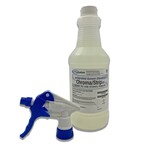

Chromaline Chroma/Strip™ iSC 1 Gal RFU CHR-SCRE013CHPG001*

    Chromaline Screen Print Products Chroma/Strip iSC Gallon: what it is

    A ready-to-use stencil remover for direct emulsions, capillary films and direct/indirect films. It contains an oxidizer and surfactants that penetrate fast and help clear leftover ink film, so there is no mixing and it does not settle.

    Best for: Everyday manual reclaiming; Removing emulsion and capillary film; Shops that want no mixing.

    How to use Chroma/Strip iSC

    1. Remove all ink from the screen first
    2. Apply to both sides of the whole screen with a soft polyester scrub brush
    3. Do not let it dry on the screen
    4. Wait briefly, then remove the stencil with high-pressure water

    Chromaline Screen Print Products Chroma/Strip iSC Gallon specifications

    Size Gallon
    Part # CHR-SCRE013CHPG001
    Type Ready-to-use stencil remover (oxidizer + surfactants)
    Mix ratio None, use as supplied
    Removes Direct emulsions, capillary films, direct/indirect films
    pH 4-5
    VOC 0% by weight
    Shelf life 2 years from date of production, sealed in original container, stored cool
    Maker sizes quart, gallon, 5 gallon, 50 gallon
    Maker part numbers SCRE01093PQ001 (quart), SCRE01093PG001 (gallon)

    Chroma/Strip iSC safety summary

    • Signal word: Danger
    • Hazards: Causes skin irritation (H315); causes serious eye damage (H318)
    • Protection: Goggles or face shield, rubber or neoprene gloves, apron
    • Flash point: No data on SDS
    • VOC: 0% by weight
    • California Prop 65: None listed
    • Storage: Keep closed; store away from extreme heat; do not freeze
    • Shipping: UN3082 Environmentally hazardous substance, liquid, n.o.s. (periodic acid), Class 9, PG III (DOT, IMDG, IATA)

    Chroma/Strip iSC downloads (SDS, TDS, instructions)

    Chromaline iSC screen chemistry overview video

    Works with Chroma/Strip iSC

    Chroma/Strip iSC FAQ

    Do I need to mix Chroma/Strip iSC?
    No. It is ready to use and does not settle.

    How do I use Chroma/Strip iSC emulsion remover?
    Clean off all ink, brush it onto both sides of the screen, wait briefly without letting it dry, then pressure wash.

    Does Chroma/Strip iSC remove capillary film?
    Yes. It works on direct emulsions, capillary films and direct/indirect films.

    Is Chroma/Strip iSC safe to handle?
    Signal word Danger: it irritates skin and can seriously damage eyes. Wear goggles, rubber or neoprene gloves and an apron. It has 0% VOC.

    Chroma/Strip iSC is a stencil remover for use with direct emulsions, capillary films, and direct/indirect films.Chroma/Strip iSCcontains an oxidizer and other agents that enhance efficiency and remove residual ink films.

    Chroma/Strip™ iSC 1 Gal RFU

    Price

    Color

    Size

    Quantity

    Add to Cart

    More Images

    Shipping

    bucketsofink has a highly developed production and shipping system and we make every effort to ship your order in a fast and effecient manner.

    Search
    Your cart is empty
    Search
     

    Select Size


    Extra Product Options


      Please enter your Layout name


      Select Type Of TextSelect Type Of Team nameSelect Type Of DesignSelect placeholder type

      Colors are not as solid, good when ordering low qty
      Colors are not as solid, good when ordering low qty
      Colors are not as solid, good when ordering low qty
      Colors are not as solid, good when ordering low qty
       

      Please enter your text


      Select a design

      Please wait while the image gallery loads


      Confirm Request Quote

      You will be redirected to a page where you can request a quote for this blank product. Any decorations you have added to this product will be removed.


      Select Product

      Select Product

        Products


        How many colors are in this design?

        You now have multiple elements making up this screenprint design

        Select the colors that appear in your design.

        You need to specify the total number of unique colors used across all the elements in your design.

        This helps us determine the pricing based on the number of colors in your design.

        • (plus white base)

        You can also specify the colors used in your design eg "Red", "Blue", "pantone 1809".

        If you dont tell us, our professional designer will work it out for you.

        • (plus white base)

        Currently selected Colors


        How many colors are in this design?

        • colored image
        • original image

        How many colors in your design?

        4 Colors

        Select the colors to be used

          COLOR PICKERS GO HERE
         

        Your Cart

        Products Qty Price
         

        Re-use existing screen print designs

        You have already used screen printing in this order. To avoid additional screen costs you can re-use an existing screen print design for this product.

        You can

        Re-use existing designs

        or


        WarningError

        Your layout contains images that have been resized to the point where they may appear blurred.

        Below-quality images listed

        Your layout contains images that appear outside the design area.

        You cannot save the product until you have moved the images within the design area.

        Your layout contains images that appear outside the design area.

        Your layout contains overlapping images.

        You cannot save the product until you have moved the images so they are not overlapping.

        Blank product purchase is not allowed

        You will not be able to purchase this product until you add a decoration design.

        Inactive blank product in use

        Product minimum quantity requirements not met

        You will need to increase the specified quantity to add this item to your cart.

        Process minimum quantity requirements not met

        Screen(s) still updating...

        You will not be able to purchase this item until all re-used screens have been updated.

        Your layout contains images that have been resized to meet the 25 megapixel limit for raster images and they may appear smaller than intended. You can avoid the raster size limit by uploading artwork in vector format when possible.

        By clicking OK, you are agreeing to accept the final product regardless of image quality. Click Cancel if you want to go back and fix the images.


        Add Team name


        Edit Team name.

        Add Another Team name
         

        Uploading file